
Cost value reconciliation
CVR software for subcontractors, built on your valuations.
VariationFlow runs a cost value reconciliation on every project, every period. Value comes from the applications and certificates already in the system. Cost goes in by head, typed or uploaded from your accounts. Your QS adds the forecast, and you can see what each job is making while there is still time to do something about it.
On the VariationFlow plan, £200 a month + VAT.
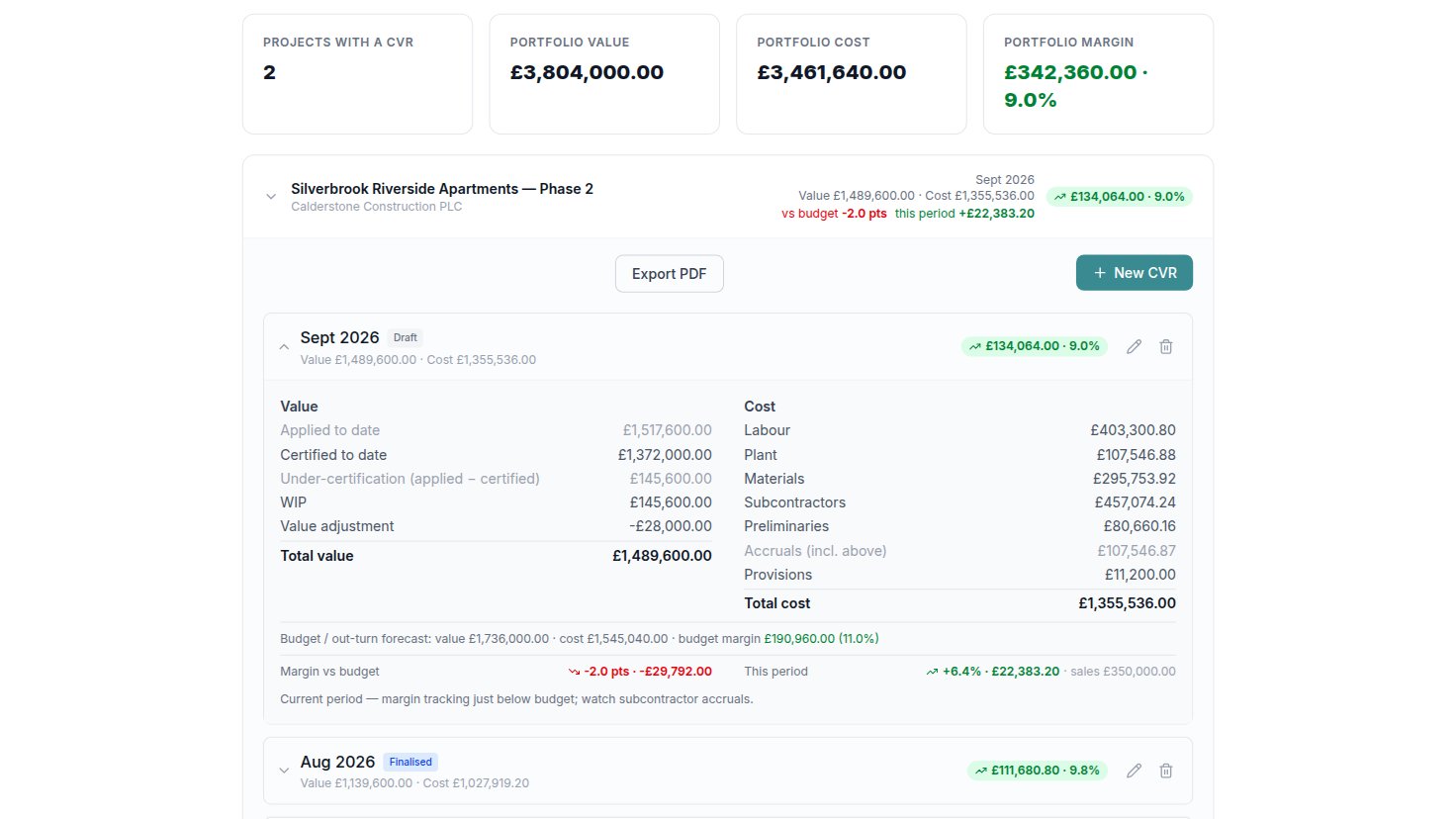
Sample figures from the VariationFlow demo company.
What a CVR is
A cost value reconciliation sets the value of the work done on a contract against what it cost to do, once a month, project by project. Value is what has been certified and applied for, plus work in progress, less anything carried prudently. Cost is cost to date by head, plus accruals for cost incurred and not yet invoiced, plus provisions for what is still to come. The difference is the margin the job has earned so far, and the forecast beside it is the margin it is heading for. It is a management report, not the cash position: a job can be ahead at the bank and still losing money.
What the CVR in VariationFlow does
It sits on the same record as your variations and valuations, so the value side of a report is there before you start it. QS, contracts managers, directors and admins can see and edit it; site roles cannot.
A CVR per project, per period
Each report carries its period end and is saved as a draft or finalised. They build up month by month, newest first, with the movement since the one before.
Value from your valuations
Certified and applied to date come from the project’s valuations as at the period end, so nobody keys them in twice. The gap between them, under-certification, is worked out for you and offered as work in progress.
Cost by head, with accruals
Labour, plant, materials, subcontractors, preliminaries and other, each with cost to date and accruals. Provisions sit on a line of their own for cost and liabilities still to come.
Adjustments and transfers
Carry a disputed variation below its claimed value with a value adjustment, and record transfers in or out where another company in your group worked on the same contract.
Margin against the forecast
Your QS enters a forecast final value and cost. Each report sets the margin to date beside the forecast margin, gives the difference in points and in pounds, and shows the period’s own margin.
Portfolio view and a printed report
Portfolio Analytics lists each live project’s latest CVR, worst margin first, with totals across them all. Any project’s CVR prints or saves as a PDF, headed with your company name.
New: tender to CVR
The tender, your costs and your rates, in the CVR
The tender as the budget
Import the tender’s bill of quantities from a CSV file or paste it straight from a spreadsheet, and map each section to a cost head with a target cost. Every CVR then shows budget against cost, head by head, and a new report can start from the tender total as its forecast final value.
Costs from your accounts
Paste or upload a cost export from your accounts package or your own cost ledger. Give each nominal code a cost head once and it is remembered next month. Rows after the period end are left out, and the totals replace cost to date while your accruals stay as they are.
Rates from the tender
Price a variation and a line that reads like an item in the tender shows that item and its rate, with one click to use it. Nothing changes without the click.
The executive view
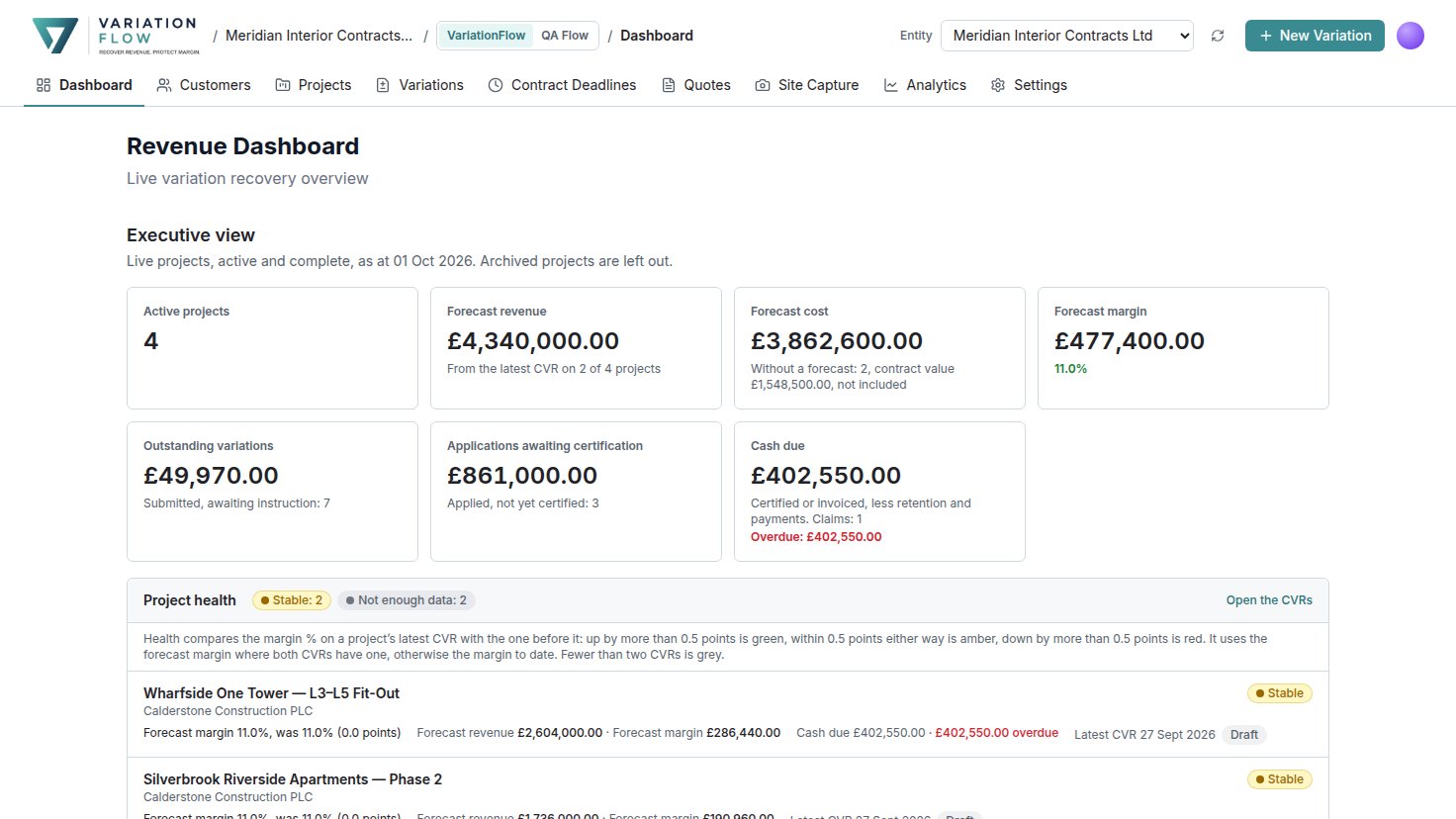
The dashboard opens with the business across its live projects: forecast revenue, cost and margin from each project’s latest CVR, outstanding variations, applications awaiting certification, and cash due with what is overdue. A project without a forecast is counted and its contract value shown beside the total, never added in.
Every project gets a health mark from its last two CVRs. Up by more than half a point of margin is improving, down by more than half a point is eroding, and anything between is stable. It compares forecast margins where both reports have one, and a project with fewer than two CVRs says so rather than guessing.
The VariationFlow plan
£200
a month + VAT, with no limit on users
CVR, the executive view and the tender tools come with the VariationFlow plan. The same plan runs site capture, the variation register, payment applications and the NEC, JCT and Construction Act deadlines. VariationFlow + QA Flow, at £400 a month + VAT, includes all of it too. Pay annually and save 20%. Paid plans have a six-month minimum term. CVR is not on the free plan or on Builder.
What to look for in CVR software
- Value that comes from your applications and certificates, not a second spreadsheet that has to be kept in step with them.
- Cost by head with accruals and provisions, so the month’s margin includes cost that has been incurred and not yet invoiced.
- A forecast your QS owns, with the margin to date measured against it every period.
- A saved report for each period, so last month’s figures are still there to compare with next month.
- The variations behind the numbers. Work done and never recorded is cost with no value against it, and no report can show you where it went.
Works beside your accounts
VariationFlow is your commercial record. Your accounts stay where they are.
Cost comes in from an export of your accounts package, or is typed in. The value side, every variation, application and certificate, is already in VariationFlow with the evidence behind it.
Your ledger, payroll, CIS returns and purchase orders stay in the accounts package you already use.
Questions
- What is CVR software?
- Cost value reconciliation software sets the value of the work done on a contract against the cost of doing it, period by period, so the margin earned to date and the margin the job is heading for can be seen before the final account rather than after it.
- Where does the value in the CVR come from?
- From the project’s valuations as at the period end. Certified and applied to date come from the payment notices and applications, so nobody keys them in twice, and the gap between them, under-certification, is worked out for you and offered as work in progress.
- Can I bring costs in from my accounts package?
- Yes. Paste or upload a cost export from your accounts package or your own cost ledger, and give each nominal code a cost head once: it is remembered next month. The totals replace cost to date, and your accruals stay as they are.
- Does it forecast the final account for me?
- No. The forecast final value and cost are your QS’s own figures. Each report sets the margin to date beside the forecast margin and gives the difference in points and in pounds.
- Which plans include the CVR?
- The VariationFlow plan, at £200 a month + VAT, and VariationFlow + QA Flow, at £400. The CVR is not on the Free or Builder plans.
Read next
What is a CVR?
The value side, the cost side, and why a job that is ahead at the bank can still be losing money.
Running a CVR in VariationFlow
The product guide: where the CVR sits, how to start a report, and the monthly routine.
Closing a final account
The evidence, the deductions that turn up at the end of every job, and the order to negotiate in.
See the CVR on a working job
A demo walks through the CVR and the executive view on the demo company’s projects, and answers how your own costs and tender would go in.